How GOV.UK One Login works
GOV.UK One Login is an OpenID Connect (OIDC)-compliant service that helps you authenticate your users who are using services they’ve logged into with their GOV.UK One Login.
GOV.UK One Login follows the Service Manual for designing for different browsers and devices.
GOV.UK One Login uses 2 different environments:
- an integration environment, which contains sample user data (for example, date of birth, address) which you can use to test your service’s integration with GOV.UK One Login
- a production environment, which is the live environment for real users to access and use your service’s integration with GOV.UK One Login
GOV.UK One Login OIDC Authorization Code Flow
The diagram shows how your service interacts with GOV.UK One Login to authenticate a user and retrieve their information following the OpenID Connect (OIDC) protocol.
It shows how keys are used to sign and verify requests and tokens to make sure there is a secure communication between your service and GOV.UK One Login.
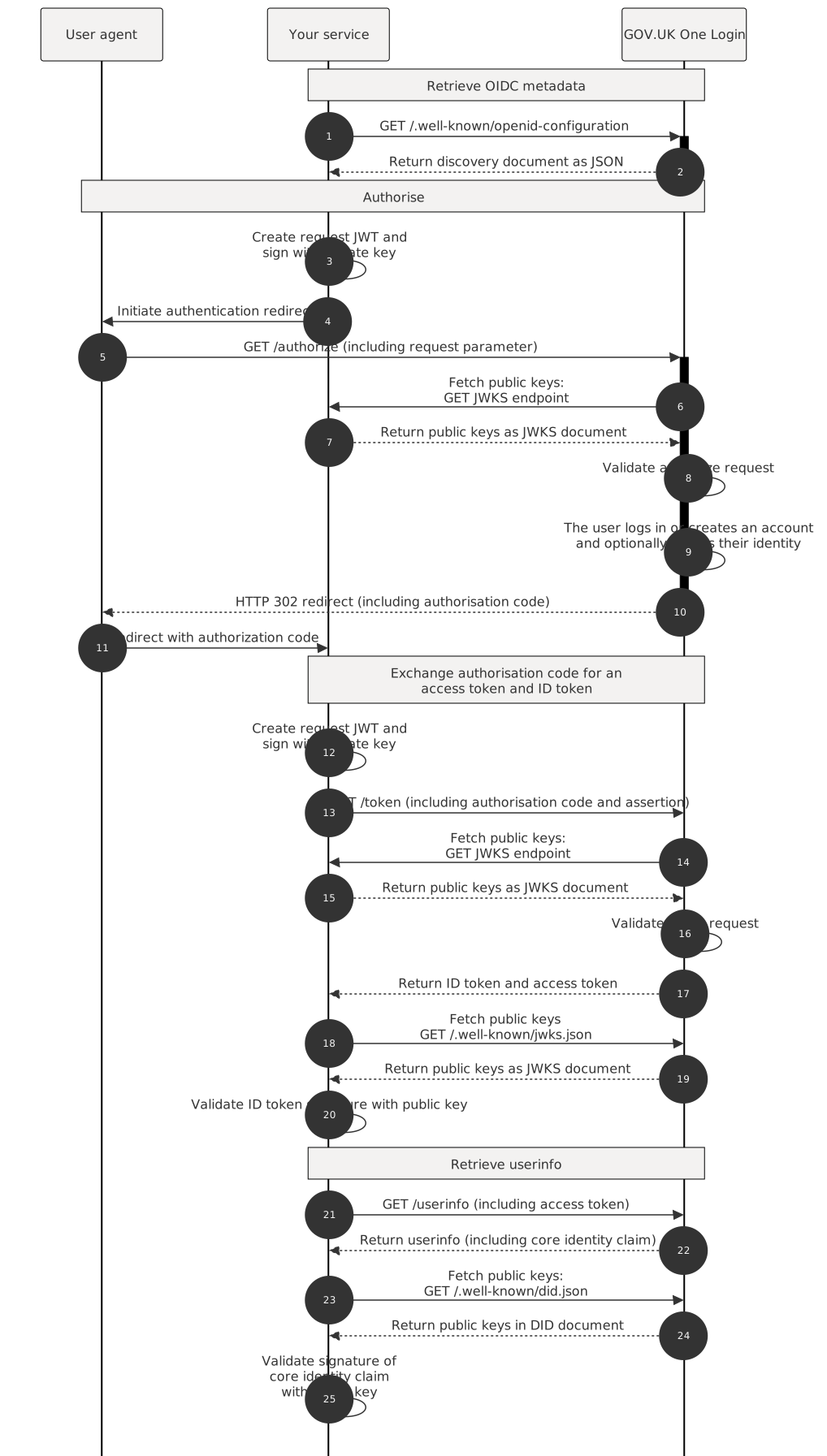
Retrieve OIDC metadata
- Your service sends a
GETrequest to GOV.UK One Login/.well-known/openid-configurationto fetch the discovery document that contains the metadata describing One Login’s behaviour as an OIDC provider .
- GOV.UK One Login returns the metadata describing GOV.UK One Logins behaviour as an OIDC provider as a discovery document.
You should “Cache the discovery document”.
Authorise
- Your service creates and signs a request with its private key.
- Your service initiates an authentication redirect to GOV.UK One Login.
- Your service sends a
GETrequest to your/authorizeendpoint. - GOV.UK One Login fetches the public keys from your JWKS endpoint registered for your service.
- Your service returns the public keys as a JWKS document. GOV.UK One Login caches these keys for 24 hours.
- GOV.UK One Login validates the authorize request. This includes validating the request JWT signature using the public key from the JWKS that matches the
kidspecified in the request JWT header. - The user logs in or creates an account and optionally proves their identity through GOV.UK One Login.
- GOV.UK One Login sends an
HTTP 302redirect back to your service’s redirect URI, including an authorisation code. - The user agent redirects with the authorization code.
Exchange the authorisation code for an ID token and an access token
- Your service creates a JWT assertion and signs it with its private key.
- Your service sends a
POSTrequest to the/tokenendpoint, including the authorisation code and assertion. - GOV.UK One Login sends a GET request to your
/.well-known/jwks.json endpointto fetch your public keys, which verify the signature on the request JWT passed in your authorize request. GOV.UK One Login caches these keys for 24 hours. - Your service returns its public keys as a JSON Web Key Set.
- GOV.UK One Login validates the token request. This includes validating the assertion JWT signature using the public key from the JWKS the matches the kid specified in the assertion JWT header.
- GOV.UK One Login returns an ID token and an access token to your service.
- Your service uses the cached copy of the public keys from GOV.UK One Login by sending a
GETrequest to the standard OIDC JWKS endpoint using the url from thejwks_uriobject in discovery document. - GOV.UK One Login returns its public keys as a JSON Web Key Set.
- Your Service validates signature of the core identity claim JWT using the public key from the DID document that matches the
kidspecified in the core identity claim JWT header.
Retrieve userinfo
- Your service sends a
GETrequest, including the access token to the/userinfoendpoint, . - GOV.UK One Login returns the userinfo (including a core identity claim if requested).
- Your service sends a
GETrequest to the GOV.UK One Login/.well-known/did.jsonto fetch its public keys, which verify the signature on the core identity claim JWT issued by GOV.UK One Login. - GOV.UK One Login returns public keys in a DID document.
- Your service validates the signature of the core identity claim with the public key from the DID document with the matching
kid.
This page was last reviewed on 9 December 2025.